


Smule: Sing, Duet & Karaoke
4.0127.84K Reviews
App Specs
- Version
- Varies with Device
- Updated On
- License
- Free
- Downloads
- 100,000,000+
- Developer
- Smule
- Categories
- Music & Audio
- Platform
- Android, iOS
Screenshots



 Analysis by AppCompare
When I open Smule: Sing, Duet & Karaoke, I’m not just picking a song and singing into my phone; I’m stepping into a social karaoke space where recordings, collaborations, and other people’s performances are part of the experience. That distinction matters. If I want a private practice tool, I may prefer something simpler, but when I’m in the mood to sing with others or listen to how they interpret a track, Smule has a more communal feel than a basic karaoke player.
When the connection becomes part of the performance
Smule is a music and audio app from Smule, and its collaborative side makes a reliable connection especially useful. Browsing performances, finding a song, joining another singer, and sharing a recording all involve moving between the app and its community. In my experience, the most enjoyable sessions are the ones where I can decide what to sing without rushing, listen to a few examples, and then record while I have time to focus.
That social setup also changes what a “quick song” means. A solo session can feel straightforward, but a duet involves another person’s contribution and the timing of your own part. I’d avoid starting one when I’m about to lose my connection or have to leave; a quiet moment with stable service makes it easier to concentrate on the performance rather than on whether the app is still loading.
Guides and Analysis on Smule: Sing, Duet & Karaoke
The app’s reach is substantial: it has more than 100 million installs and an average rating of 4.0 from around 4.1 million ratings. Those figures suggest a large audience, but they don’t guarantee that every song or interaction will suit me. I treat the community as part of the appeal, not as a promise that every session will immediately find the right collaborator.
Choosing the right moment and setting
Smule works best for me when the setting matches the kind of performance I want to make. At home, I can take time to settle on a track, try a vocal effect, and decide whether I want to record video or keep the focus on audio. On a commute or in a busy room, the same creative process is less comfortable: background noise can distract me, and singing aloud may simply not be practical.
A useful everyday routine is to browse and save the idea of a song for later, then record when I have a calm space and enough time to listen back. That small separation helps me avoid treating every open session as a performance deadline. It also makes the app more useful for someone who sings for fun but doesn’t always have a private room available.
For a first duet, I’d choose a familiar song and listen to the other singer’s part before recording my own. That gives me a sense of the pace and mood instead of forcing me to guess where to come in. If I’m trying a new style or a song I barely know, a solo recording is a lower-pressure way to learn how the backing track feels before I collaborate.
Worth Reading Before You Choose

Baby Panda World Brings Quick Play to Modern Phones, but Its Game Library Feels Busy

ESPN’s Live Game View Makes Following Close Games Easier

QuizzLand Review: A Good Fit for Short Trivia Breaks, Not Every Player

Basketball Stars: Multiplayer Is Fast, but Can It Recover When Matches Go Wrong?

WEBTOON Turns Phone Updates Into a Better Reading Routine

Link to Windows Runs on Shared Habits, Not Social Feeds
Getting Started with Smule
First things first, let's talk about diving into the app. Setting up Smule is a breeze. You just download it from your app store, create an account—either via email or social media—and boom, you're in! The user interface is sleek and intuitive, making it super easy to find your way around. Whether you're tech-savvy or just a casual user, navigating through Smule feels like a walk in the park.
Features That Hit the Right Note
If you're a karaoke fan, you’re in for a treat. This app is packed with features that can turn your solo shower sessions into full-on performances. Here are some of the highlights:
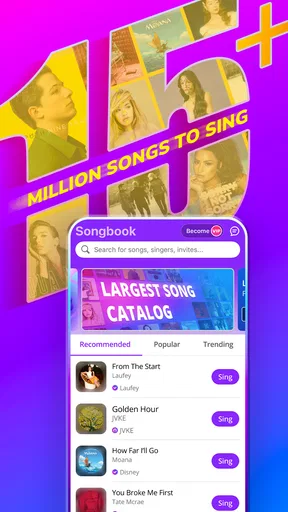
- Vast Song Library: From pop hits to classic rock, the library is extensive. You can search for your favorite tracks and even discover new ones through trending lists.
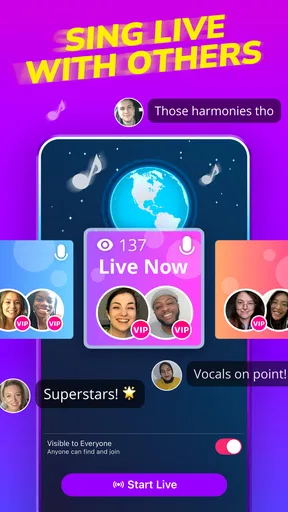
- Duet Options: One of my favorite features! You can pair up with singers from all over the world. Whether it's a friend or a stranger, duetting adds a whole new layer of fun.
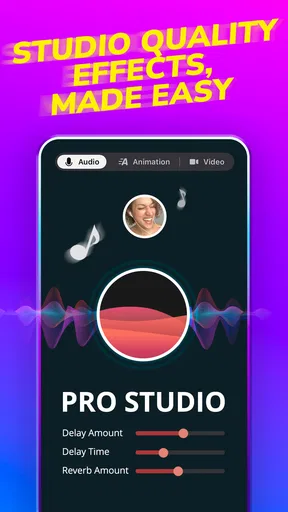
- Voice Effects: Not everyone is born with Adele’s pipes, and that’s okay! Smule offers a variety of voice effects to help you sound your best.
- Video Performances: Feeling a bit more adventurous? Record video performances and share them with the community. It’s like having your own music video shoot right in your living room!
Jamming with the Community
One of the standout features of Smule is its vibrant community. It's not just about singing—it’s about connecting. You can follow other users, join groups based on your music taste, and even participate in collaborative songs. The social aspect really amps up the experience, and you'll often find yourself cheering others on as they perform.
Plus, if you're competitive like me, you'll love the opportunity to join contests and challenges. It's a fun way to test your skills and see how you stack up against the rest of the world.
Performance and Usability
Using Smule, I was pleasantly surprised by how smoothly it runs. The app doesn't lag, which is crucial when you’re trying to keep up with a fast-paced song. The audio quality is top-notch, and it syncs well with the backing tracks. The only hiccup I encountered was occasional buffering, but this was rare and likely due to network issues on my end.
The app is regularly updated, which is always a good sign. The developers seem committed to enhancing user experience and keeping the song library fresh and exciting.
What to do when a session stalls
Even a generally smooth session can be interrupted by buffering or a slow connection. When that happens, I’d pause before repeatedly tapping controls: give the current screen a moment to respond, then check whether other online content is loading normally. If the connection is the issue, moving to a steadier network before choosing a duet or uploading a performance is more useful than restarting the same action over and over.
I also find it sensible to separate the creative part from the sharing part. Get the performance ready when I’m focused, then handle community browsing and posting when the connection is behaving. That reduces the frustration of losing momentum mid-song. It’s a practical distinction for any app built around shared recordings: recording is the personal moment, while discovery and collaboration depend more heavily on the network.
Keeping mobile use intentional
Because browsing performances and participating with other singers can involve continued online activity, I wouldn’t leave the app open just to pass time if I’m trying to limit mobile data. I can browse when I’m on a trusted connection, settle on a song, and save the actual recording for a quieter moment. This is less about avoiding the app and more about choosing when its connected features are worth using.
For video, I’d be deliberate about when I record and share. Audio-only singing is the more natural choice when I don’t want to prepare a camera-ready setting, while video makes sense when I’m happy to be seen and want the visual part of the performance. Thinking about that before I begin saves time and keeps the session aligned with what I actually want to share.
Smule is free to download, and it is rated Teen. The app includes in-app purchases, with listed items ranging from $0.01 to $99.99. I’d explore the free experience first and decide whether I use it often enough to justify spending. In particular, I’d check which songs or tools matter to my routine before paying, rather than assuming a purchase is necessary just because the app offers one.
How it compares with simpler karaoke apps
A conventional karaoke app is often the better fit if all I want is a backing track and a private sing-along. Smule’s appeal is that it adds other singers, shared performances, and a community to browse. That makes it more rewarding when I want a duet or a reason to return to a song and hear different interpretations, but it can feel like extra activity when I only want to practice one chorus without an audience.
It also isn’t a substitute for a dedicated recording setup. Voice effects can make a casual performance more enjoyable, but anyone aiming for detailed control over a polished music production may prefer a recording app designed around editing and audio work. I see Smule as a place to perform and connect, not as a full studio or a vocal lesson plan.
The app is currently version 12.7.9 and requires Android 6.0 or later. Those details help Android users judge basic compatibility, while the core decision is more personal: do I want a connected singing community, or do I mainly need a straightforward karaoke player? The first answer points toward Smule; the second may point toward a simpler alternative.
In-App Purchases and Accessibility
While Smule is free to download, there are in-app purchases. Subscriptions offer benefits like unlimited access to the song library and enhanced audio effects. If you're a regular user, the subscription might be worth it. However, for casual users, the free version is still highly enjoyable.
Accessibility-wise, Smule is well-designed. It’s user-friendly for people of all ages, and the straightforward layout means you won't spend hours trying to figure out how to record your first song.
Who will enjoy it most—and who may not
I’d recommend Smule to someone who likes singing socially, enjoys trying different vocal treatments, or wants to make a song feel like a small shared event. It can also suit a shy beginner: recording at home and listening back gives me room to experiment before deciding whether I want to share. The community can make singing feel less solitary, though it’s still important to choose a level of participation that feels comfortable.
I’d steer away from it if I wanted a completely private, distraction-free practice tool, if I dislike browsing other people’s performances, or if I need sophisticated recording controls. It may also be a poor fit for a session where the connection is unreliable and I’m counting on seamless collaboration. In those cases, a basic karaoke player or a dedicated recorder is likely to feel more direct.
Smule was released on December 27, 2012, and its continued presence in music and audio reflects the lasting appeal of singing with other people. A large community is a genuine advantage for discovery, but it can also mean that the experience is social by design rather than tailored solely to my own practice. I’d approach it with that expectation: the app is at its best when I’m open to sharing the moment.
A connected experience, with the right expectations
All in all, Smule: Sing, Duet & Karaoke is a fantastic app for anyone who loves music. Whether you want to sing solo, duet with friends, or engage with a vibrant community, it’s got something for everyone. It's not just an app; it’s a platform to express yourself and connect with like-minded music lovers around the globe.
If you're ready to unleash your inner superstar, give Smule a try. Who knows, you might just discover a new passion—or at the very least, have a blast singing your heart out.
My practical verdict on connectivity
For me, the connection is not a minor technical detail; it shapes when Smule feels effortless and when it asks for patience. I’d browse and explore when I have a dependable connection, then choose a quiet place and give a recording my attention. When I want a fast, private sing-along or need precise studio-style editing, I’d reach for a simpler or more specialized tool instead.
That balance is why I’d still recommend Smule to the right person. Its strongest point is the combination of singing and community, while its most noticeable trade-off is that the connected experience works best when I can give it time and a stable setting. If that sounds appealing, it’s worth trying; if not, a solo karaoke app may suit the way you sing better.
Pros
- Wide variety of songs available.
- User-friendly interface.
- High-quality audio recordings.
- Collaborative duets with friends.
- Regular updates with new features.
Cons
- Requires a stable internet connection.
- Some features behind a paywall.
- Ads can be intrusive at times.
- Limited offline capabilities.
- Consumes a lot of device storage.
FAQs for Smule: Sing, Duet & Karaoke
What is Smule and how does it work?
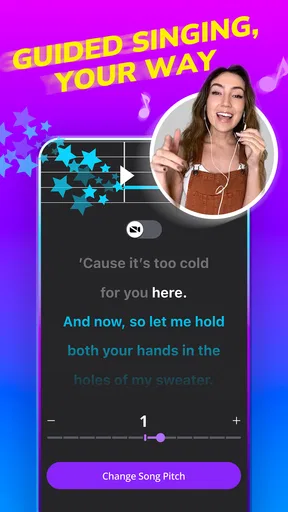
Smule is a social singing app that allows users to sing karaoke solo, duet, or in groups with friends or other users around the world. You can choose from a vast library of songs, add audio effects, and even record video performances. It also offers features like live performances and collaborations with artists.
Is Smule free to use?
Smule offers a free version with access to a limited selection of songs and features. However, for an enhanced experience, including an ad-free interface and access to the full song library, users can opt for a VIP subscription. This subscription is available on a monthly or yearly basis.
Can I use Smule offline?
Smule primarily requires an internet connection to stream songs and interact with the community. However, with a VIP subscription, you can save your favorite recordings offline for later playback. This feature is useful for practicing or enjoying your performances without an internet connection.
What devices are compatible with Smule?
Smule is available on both Android and iOS devices. It is compatible with most smartphones and tablets that meet the basic operating system requirements. Ensure your device has a good quality microphone and speaker for the best singing experience. Updates and device compatibility can be checked in the app store.
How can I improve my singing on Smule?
To improve your singing on Smule, make use of the app's vocal effects and pitch correction features. Regular practice is key, and you can learn from other users by joining duets or group performances. Additionally, participating in challenges and community events can provide valuable feedback and motivation.


